Bringing your work in
Explore references
A curated Are.na browser inside the board, so a reference is a drag away instead of a tab away.
Reference hunting usually means leaving the board, and the board is where the reference has to end up. **Explore** puts a curated slice of Are.na inside Plnty: browse it in a window over your canvas and drag what you want straight down onto the board. Open it from the **Explore** pill in the top bar while a board is open. ## What is in it Collections curated by people on Are.na, grouped into seven categories: | Category | The kind of thing in it | | - | - | | Art | Painting, photography, mixed media | | Design | Product, industrial, spatial | | Graphic Design | Type, layout, print, identity | | Objects | Furniture, tools, artefacts | | Materials | Surfaces, textures, patina and decay | | Nature | Landscape, botanical, organic form | | Gradients & Color | Palettes and colour studies | Each collection keeps its curator's name, which is worth more than it sounds. A channel is somebody's taste held over time, so a collection that keeps producing the right thing is one to come back to rather than a lucky search. ## Getting one onto the board Drag an image out of the grid and drop it on the canvas. It lands as a normal image reference, so from that moment it behaves like anything else you uploaded: feed it to a tool, put it in a frame, drop it on a prompt card as a style reference. The window floats above the canvas and can be moved, so you can keep it open while you work rather than treating it as a mode you enter and leave. :::tip[Drag the reference into the tool, not just onto the board] A reference you dropped is already an input. Dropping an Are.na image straight onto an image tool's drop area saves the round trip through the canvas, and it is the fastest way to test whether a look is the direction. ::: ## Where it came from An image dropped from Explore records that it came from Are.na. That shows up in the same place every other asset's origin does, so a board full of references six months later can still tell you which images were yours and which were pulled in as reference. [Provenance](/docs/using-plnty/the-asset-library/provenance/) covers the rest of what an asset remembers. 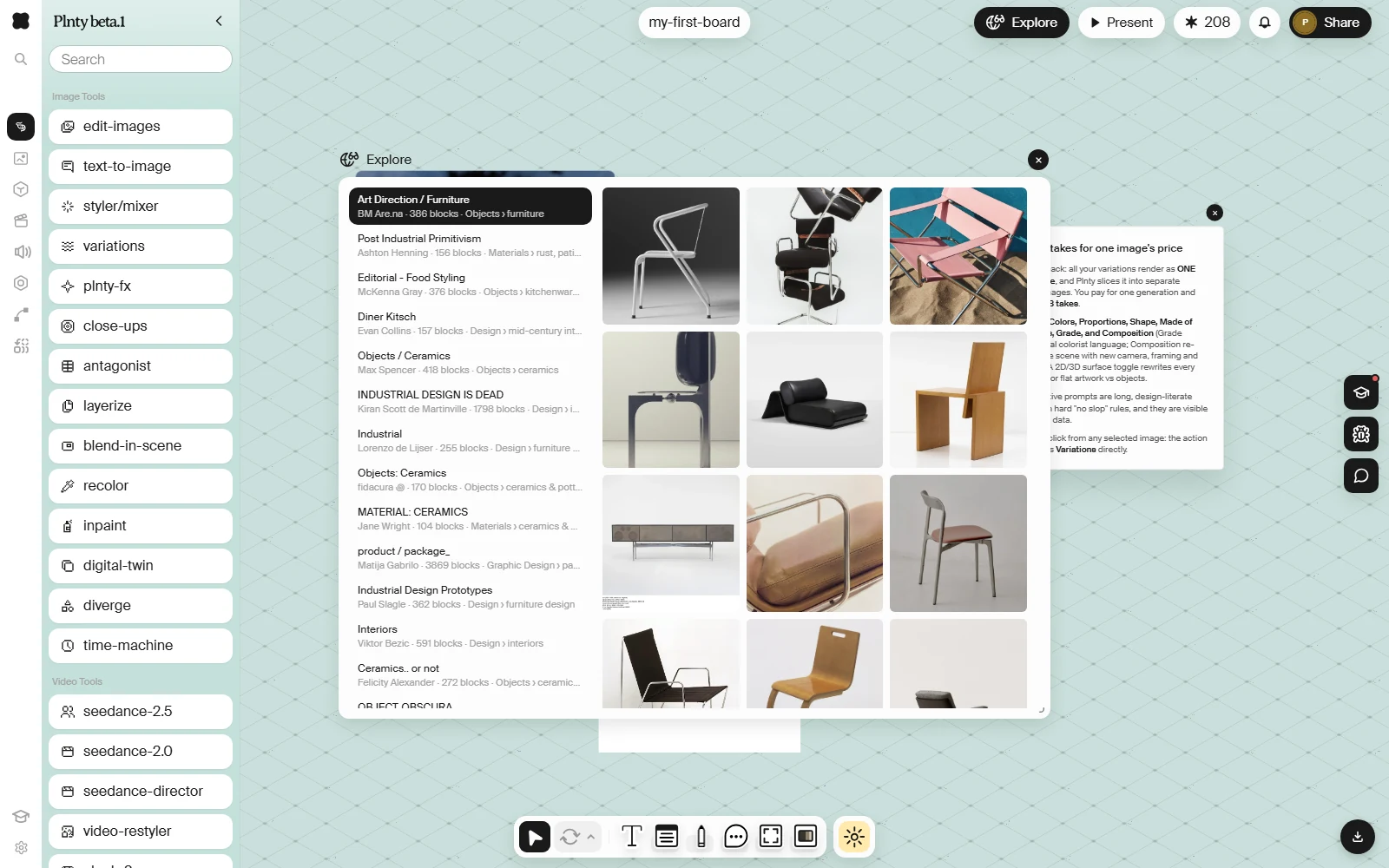Reference hunting usually means leaving the board, and the board is where the reference has to end up. Explore puts a curated slice of Are.na inside Plnty: browse it in a window over your canvas and drag what you want straight down onto the board.
Open it from the Explore pill in the top bar while a board is open.
What is in it
Section titled “What is in it”Collections curated by people on Are.na, grouped into seven categories:
| Category | The kind of thing in it |
|---|---|
| Art | Painting, photography, mixed media |
| Design | Product, industrial, spatial |
| Graphic Design | Type, layout, print, identity |
| Objects | Furniture, tools, artefacts |
| Materials | Surfaces, textures, patina and decay |
| Nature | Landscape, botanical, organic form |
| Gradients & Color | Palettes and colour studies |
Each collection keeps its curator’s name, which is worth more than it sounds. A channel is somebody’s taste held over time, so a collection that keeps producing the right thing is one to come back to rather than a lucky search.
Getting one onto the board
Section titled “Getting one onto the board”Drag an image out of the grid and drop it on the canvas. It lands as a normal image reference, so from that moment it behaves like anything else you uploaded: feed it to a tool, put it in a frame, drop it on a prompt card as a style reference.
The window floats above the canvas and can be moved, so you can keep it open while you work rather than treating it as a mode you enter and leave.
Where it came from
Section titled “Where it came from”An image dropped from Explore records that it came from Are.na. That shows up in the same place every other asset’s origin does, so a board full of references six months later can still tell you which images were yours and which were pulled in as reference.
Provenance covers the rest of what an asset remembers.
